Configure a network transition
Use the gateway to configure a network transition to H1, MPI, or PROFIBUS. The gateway enables communication between the Octoplant server and an automation device that cannot be reached directly through the server's TCP/IP network.
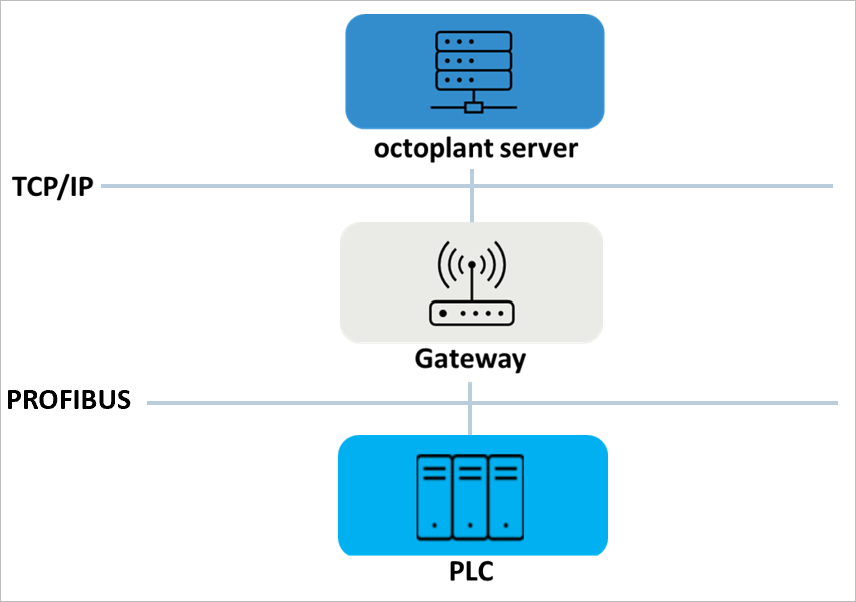
Prerequisites for configuring a network transition
- The gateway must be installed on a PC that can be reached through the server's TCP/IP network.
- The network transition from TCP/IP to H1, MPI, or PROFIBUS requires the [SimaticNet] section to be configured in the
VDogGateway.iniconfiguration file. The gateway communicates through the channel defined by the access point configured by[SimaticNet]\AccessName. For this communication channel, SIMATIC NET must be available, installed, and licensed with the required support for the network interfaces.
Configuration of the gateway
The settings for the Gateway are configured using the INI file VDogGateway.ini. The file can be found under: {Drive}:\vdoggateway\VD$A\Configuration\
- Open the
VDogGateway.inifile using a text editor, for example Notepad++. - Implement the desired settings. Possible settings can be found in the following table.
- Save the data and close the text editor.
VDogGateway.ini file sections
Rfc1006
The [Rfc1006] section is used to configure the network transition from TCP/IP to H1, MPI or PROFIBUS.
| Key | Description | Value | Default |
|---|---|---|---|
| Enabled | Key for activating communication via RFC 1006 | Y/N | Y |
TCPIP
The [TCPIP] section is used to configure the port.
| Key | Description | Value | Default |
|---|---|---|---|
| Port | Key for configuring the port for communication via RFC 1006. By default, communication takes place via port 102. If this port is already occupied, another port number must be assigned to the service. | {1...65535} | 102. |
SimaticNet
The [SimaticNet] section is used to configure access to the SIMATIC NET PC software.
| Key | Description | Value | Default |
|---|---|---|---|
| Enabled | Key for activating the interface to SIMATIC NET | Y/N | Y |
| AccessName | Key for configuring the access point (also called AccessPoint) via which the desired communication channel is defined in SIMATIC NET | {Name of the access point} | S7Online |
Example configuration
FAQ
Why is the gateway not starting?
The VDogGateway service communicates using the port 102 (RFC1006) by default. If this port is already used by another application (e.g. by the Siemens IEPG Helper Service, name of the service: s7oiehsx.exe ), the service should be assigned a different (unused) port number. To assign a specific port number to the VDogGateway service, the following section must be added to the VDogGateway.ini file or the TCPIP section contained in it must be changed as follows:
Path: ..\{directory where the file VDogGateway.exe is located}\VD$A\Configuration
File:
VDogGateway.ini
Section:
[TCPIP]
Key=Value:
Port={A number in the range 1..65535}
Related topics