Edit the working directory
You can open the working directory in the file manager using one of the following options:
- The menu bar on the Home tab
- The context menu (Show in file manager)
- The Ctrl+E keyboard shortcut
You can configure the default file manager in the Client settings dialog.
Display project size before Check-Out
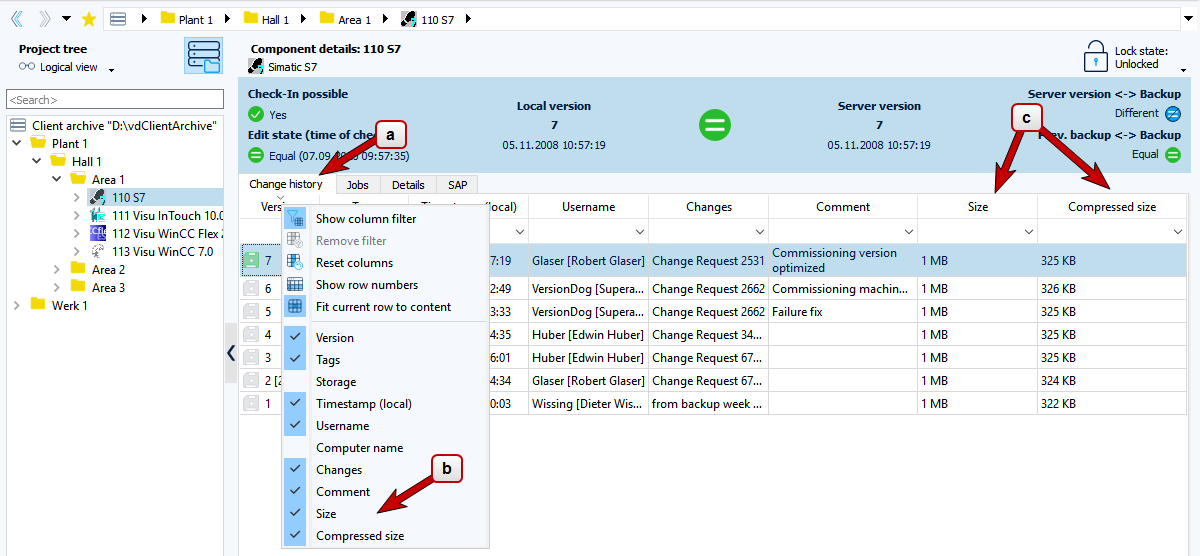
To see the full or compressed size of a project before Check-Out, proceed as follows:
- Right-click the header row in the Change history tab.
- Select the Size and/or Compressed size columns in the dropdown menu.
The Change history tab now shows the sizes of all projects in the preselection.
FAQ
How can I subsequently calculate the packed size or the size of the components?
Prerequisites
-
First create a backup of the entire server archive to be on the safe side, as the tool changes almost every file in the server archive.
-
The server must be in the Maintenance mode.
-
In server synchronization: All servers must be in the Maintenance mode.
-
In server synchronization, you must run the tool on each server and wait for it to complete. To avoid longer downtimes, it is best to run the tools on all servers simultaneously.
-
Octoplant can continue to run.
Execution
-
The VDogArchiveCheck tool is located in the server installation directory. By default, this can be found under
C:\Program Files(x86)\vdogServer. -
Start the VDogArchiveCheck tool via the command line:
-
The tool has run successfully if no error message is displayed.
- Deactivate Maintenance mode.
For further inquiries, submit a support ticket via the myAMDT portal.
Related topics